7 Powerful minecraft circle generator Tools to Build Perfect Circles
Table of Contents
Remember staring at your screen, watching what was supposed to be an elegant circular fountain transform into something resembling a misshapen potato? That sinking feeling hits hard when you’ve spent two hours carefully placing blocks, only to step back and realize your “circle” looks nothing like the vision in your head. You’re not alone in this struggle—thousands of builders face this exact challenge every single day.
The truth is, creating curves in a world made entirely of squares feels counterintuitive at best and impossible at worst. But here’s what changed everything for me: discovering that I didn’t have to fight against Minecraft‘s blocky nature. Instead, I learned to work with it using specialized tools designed specifically for this purpose. Today, you’ll discover seven game-changing resources that transform circular construction from an exercise in frustration into an achievable, even enjoyable, building experience.
Why Perfect Circles Are So Challenging in Minecraft
Your building ambitions shouldn’t be limited by technical constraints. Yet Minecraft‘s fundamental design—a universe constructed entirely from cubic blocks—creates an inherent mathematical puzzle. When you attempt to approximate smooth curves using square units, achieving visual harmony becomes surprisingly complex.
Think about it this way: drawing a circle on paper involves one continuous line. In Minecraft, that same circle requires hundreds of individual decisions about block placement. Should this section extend three blocks or four? Does the curve need to step inward here or continue straight? These micro-decisions multiply exponentially as your circle diameter increases.
Most builders start by “eyeballing” their circular structures, placing blocks based on what looks roughly correct. This approach might work for small builds under ten blocks wide, but scaling up reveals glaring asymmetries. What appeared acceptable from ground level looks distinctly lumpy from above, and fixing these errors often means tearing down and rebuilding entire sections.
What Is a Minecraft Circle Generator?
A Minecraft circle generator solves your circular construction challenges through mathematical precision. These digital tools calculate the exact block placement needed for any circle diameter, removing guesswork from the equation entirely.
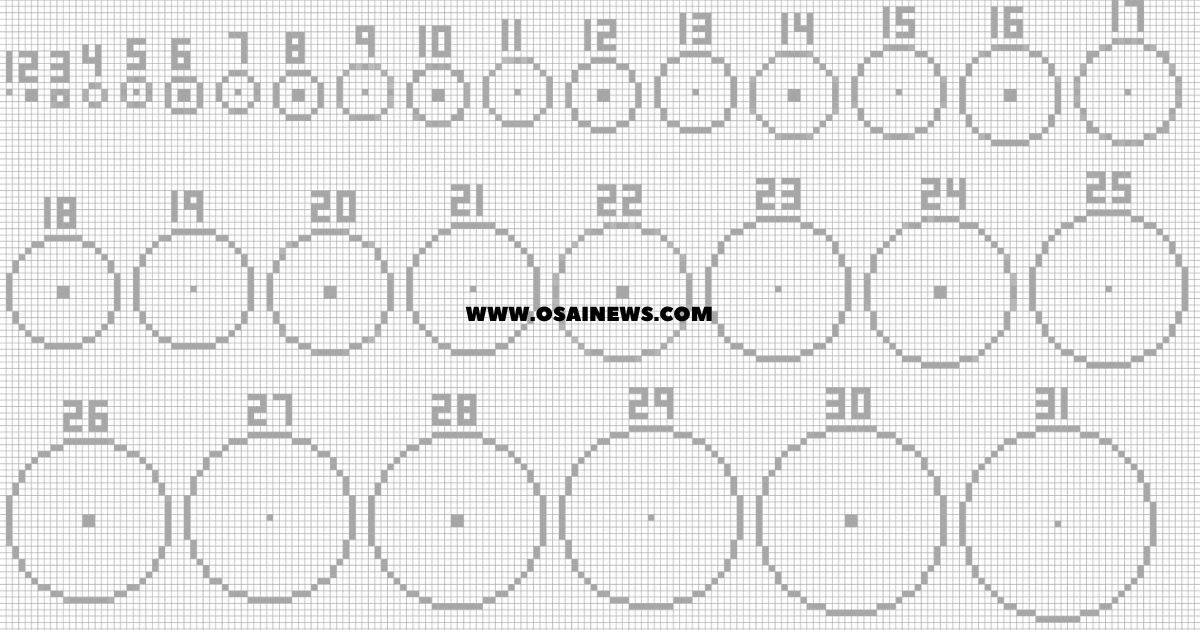
Here’s how they operate: you input your desired measurements—typically the circle’s diameter and whether you want it filled or hollow. The generator processes this information through algorithms specifically designed for grid-based approximation, then outputs a visual template showing exactly where each block belongs.
The benefits stack up quickly:
- You eliminate countless hours of trial-and-error adjustments
- Mathematical accuracy ensures perfect symmetry every time
- Scaling works seamlessly from tiny 5-block circles to massive 500-block structures
- Preview functionality lets you visualize results before placing a single block
- Templates work across all Minecraft versions—Java, Bedrock, Pocket Edition, and console
The 7 Most Powerful Minecraft Circle Generator Tools
1. Plotz Minecraft Modeller – Best for 3D Spheres and Circles
When your project demands three-dimensional precision, Plotz delivers unmatched capability. This web-based powerhouse specializes in spherical structures, making it your go-to resource for domes, planetariums, and spherical builds of any scale.
What sets Plotz apart? The layer-by-layer visualization system. Instead of showing you a flat representation and leaving you to figure out the vertical component, Plotz breaks down your sphere into horizontal slices. You build one layer at a time, following clear guidance for each elevation level.
The interface includes a material calculator—absolutely essential for survival mode planning. Enter your dimensions, and Plotz tells you exactly how many blocks you’ll need. No more discovering mid-build that you’re 200 stone blocks short.
Key capabilities:
- Handles diameters up to 256 blocks
- Creates circles, ellipses, spheres, and even torus shapes
- Mobile-friendly interface works on tablets
- Free to use without registration
Plotz shines brightest when you’re tackling architectural challenges like observatory domes or decorative sphere gardens. The learning curve is gentle enough for beginners while offering depth that advanced builders appreciate.
2. Minecraft Circle Generator by Donat Studios – Best for Simple 2D Circles
Sometimes you need answers fast, without complexity getting in the way. Donat Studios’ generator represents pure simplicity—enter your diameter, choose hollow or filled, and get instant results.
This tool excels at speed. Within seconds of loading the page, you can generate, screenshot, and start building. The clean interface displays your circle as a pixelated grid, with filled squares representing block placement positions.
Testing reveals impressive time savings. A 50-block diameter circle that might consume three hours through manual construction drops to roughly 30 minutes when following a template. For survival mode builders watching daylight hours tick away, this efficiency matters enormously.
The generator handles both even and odd diameters gracefully, though you’ll find odd numbers (11, 21, 31) create more aesthetically pleasing centered builds. Why? Odd diameters give you a single center block rather than a 2×2 center area, making symmetrical construction more intuitive.
3. Pixel Circle Generator – Best for Pixel Art Circles
Your decorative ambitions deserve dedicated tools. This specialized generator focuses on pixel-perfect circular designs, making it invaluable for artists creating floor patterns, circular banners, or geometric decorations.
Variable thickness control sets this option apart. Want a 3-block wide ring instead of a standard 1-block outline? Adjust the thickness slider and watch your template update instantly. This functionality proves essential when designing circular racing tracks or ornate floor medallions.
The color-coding system helps you plan multi-material builds before placing a single block. Assign different colors to represent various block types—perhaps blue for diamond blocks, red for redstone, yellow for gold. Your template becomes a complete construction blueprint rather than just a shape guide.
Grid overlay options let you align your circle with existing structures or plan spacing between multiple circular elements. This attention to detail transforms good designs into exceptional ones.
4. MinecraftCircle.com – Best for Multiple Circle Sizes Simultaneously
Complex architectural projects often require multiple concentric circles—think amphitheater seating, rose windows, or layered fountain designs. Generating each circle separately wastes time and creates coordination headaches. MinecraftCircle.com solves this by displaying up to five different circle sizes simultaneously.
This comparative view proves incredibly practical. You can instantly see how a 20-block inner circle relates to a 30-block middle ring and a 40-block outer boundary. The spatial relationships become clear before you commit resources to construction.
The print layout optimization deserves mention. Unlike some generators that create awkward, wasted-paper screenshots, this tool formats templates efficiently for standard letter or A4 paper. Print your multi-circle blueprint, clip it beside your monitor, and reference it without constant alt-tabbing.
Mobile responsiveness means you can generate templates on your phone during your lunch break, ready to build when you get home. The accessibility factor shouldn’t be underestimated—inspiration strikes unpredictably, and having tools that work anywhere helps you capture ideas before they fade.
5. Oresome Minecraft Circle Generator – Best for In-Game Overlay
Switching between your browser and game window disrupts focus and slows construction. Oresome takes a different approach—it puts the generator directly inside Minecraft as a transparent overlay.
Installation requires the Forge or Fabric mod loader, which adds a complexity barrier compared to web-based solutions. However, the workflow improvement justifies the setup time. Press your designated hotkey (default: C), and a translucent circle template appears in your game world, positioned exactly where you’re looking.
Real-time adjustment capabilities transform the building process. Enlarge or shrink your circle using arrow keys while watching the overlay update instantly. Found the perfect size? Lock it in and start placing blocks that align perfectly with the ghost template.
Streamers and content creators particularly benefit from this approach. Your audience sees the planning process happening naturally within gameplay rather than watching you fumble through external windows. The professional polish this adds to building streams shouldn’t be overlooked.
6. Minecraft Ellipse Generator – Best for Oval and Elliptical Shapes
Circles are wonderful, but sometimes your design calls for stretched, oval shapes. Maybe you’re building a racing circuit that needs a proper oval track, or perhaps your swimming pool design demands an elongated ellipse. Standard circle generators fail here—they only create perfectly round shapes.
The Ellipse Generator adds independent width and height controls, letting you create any oval proportion imaginable. Want something twice as wide as it is tall? Set width to 40 and height to 20. The generator calculates the proper curve for both axes, maintaining smooth transitions throughout.
Rotation angles expand your creative possibilities further. A 45-degree rotated ellipse creates diamond-like shapes perfect for decorative floor patterns or unique building footprints. Experimenting with different rotation values often reveals unexpected design opportunities.
The filled versus hollow toggle affects material requirements dramatically. A hollow 60×40 ellipse might use 300 blocks, while the filled version consumes over 1,800. For survival mode builders managing limited resources, this calculator prevents costly surprises.
7. WorldEdit Circle Command – Best for Instant In-Game Generation
When you need circles generated instantly without templates or manual placement, WorldEdit’s command system delivers unmatched speed. This plugin (for servers) or mod (for single-player) creates perfect circular structures with a single typed command.
The basic syntax follows a logical pattern:
//hcyl stone 20 1creates a hollow stone cylinder with a 20-block radius and 1-block height//sphere glass 25generates a glass sphere with a 25-block radius//cyl grass 15 1produces a filled grass circle 15 blocks from center
Power users combine these commands with WorldEdit’s selection tools for extraordinary efficiency. Mark a specific area, run your circle command within those boundaries, and watch structures materialize in seconds. What might take an hour through manual construction happens nearly instantaneously.
The learning curve here is steeper than web generators. You’re working with command syntax rather than graphical interfaces. However, once you internalize the basic command structure, you’ll find this method addictively fast for large-scale projects.
Creative mode builders and server administrators gain the most from WorldEdit. Terraforming entire landscapes, creating massive arenas, or prototyping complex builds becomes dramatically faster when circles appear on command.
How to Choose the Right Minecraft Circle Generator for Your Project
Your specific situation determines which generator serves you best. A beginner tackling their first circular fountain has different needs than an experienced architect planning a massive colosseum.
Match tools to skill level:
- Complete beginners benefit from simple web generators like Donat Studios
- Intermediate builders appreciate the planning features in MinecraftCircle.com
- Advanced users maximize efficiency with WorldEdit commands
Consider your platform:
- Bedrock Edition players should stick with web-based generators (mod compatibility is limited)
- Java Edition opens all possibilities, including in-game overlays and WorldEdit
- Mobile players need generators with responsive, touch-friendly interfaces
Scale matters significantly:
- Small builds under 20 blocks work with any generator
- Medium structures (20-50 blocks) benefit from printable templates
- Large builds (50-100 blocks) justify the time investment in Plotz or overlay mods
- Massive projects (100+ blocks) practically demand WorldEdit’s instant generation
Your Circles, Perfected
Those frustrating hours spent demolishing and rebuilding wonky circular structures? They’re behind you now. These seven generators transform circular construction from guesswork into precise, achievable craft.
Start with something simple—perhaps a 15-block diameter circular garden or a round tower base. Choose a web generator, create your template, and experience how satisfying perfectly symmetrical construction feels. That confidence you build tackling smaller projects prepares you for the ambitious circular masterpieces you’ve been imagining.
Which generator matches your current project? Open one today and generate your first perfect circle. Your Minecraft world deserves the architectural excellence these tools make possible.